
I use a variety of languages on my computer, but most recently, I’ve wanted to use the Russian keyboard. On Windows, you can cycle between the languages using Alt + Shift, but I wanted to toggle quickly between two languages, specifically English and Russian, preferably with a single keypress. This calls for AutoHotKey!
I settled on using the Right Alt key for this because I never use this key. I happily coded a simple script to toggle between two languages, and… it didn’t work. It only ever toggled to Russian, and never toggled back.
Check the target language’s keyboard layout. I didn’t, and that ruined my Saturday morning as I checked and double-checked my script, read up on AutoHotKey’s scripting format, and finally discovered that for Russian, the Right Alt key is actually AltGr, or Left Ctrl + Right Alt.
After making a tiny change to my script, everything works as expected. I have gained a miniscule but significantly greater comfort when having to work between two languages. I think this is really useful, especially if you have multiple languages installed on your computer.
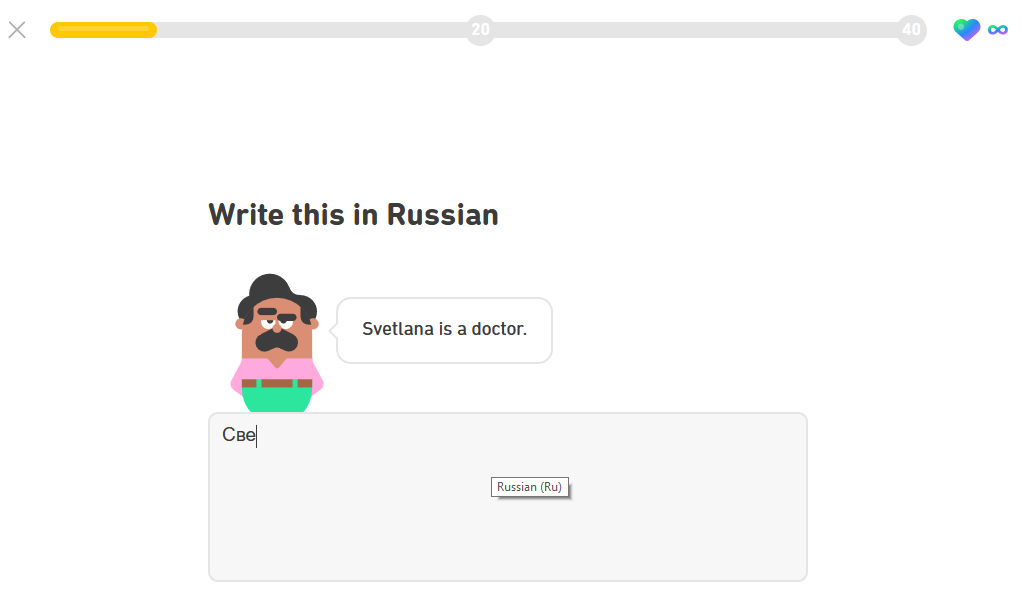
Пвивет! Now with Tooltip
An unexpected benefit is that if my input language changes if I press something in another program, I can quickly toggle it back to Russian or English. Another small help is a little tooltip that will indicate the current input language for two seconds before disappearing.
; Toggle between Russian (Ru) and English (Eng) keyboard layout
; Define the hotkey to toggle between layouts
RAlt::
V++
ToggleLanguage(V)
return

RAlt & RCtrl::
V++
ToggleLanguage(V)
return

ToggleLanguage(V){

    M:=mod(V,2)
    if (M) {
        ; Set Russian (Ru) keyboard layout
        SetKeyboardLayout(0x0419)
        Tooltip, Russian (Ru)
    } else {
        ; Set English (Eng) keyboard layout
        SetKeyboardLayout(0x0409)
        Tooltip, English (Eng)
    }
    SetTimer, RemoveTooltip, 2000 ; Remove the tooltip after 2 seconds
return
}

; Function to set the keyboard layout
SetKeyboardLayout(LocaleID) {
Static SPI_SETDEFAULTINPUTLANG := 0x005A, SPIF_SENDWININICHANGE := 2
	Lan := DllCall("LoadKeyboardLayout", "Str", Format("{:08x}", LocaleID), "Int", 0)
	VarSetCapacity(binaryLocaleID, 4, 0)
	NumPut(LocaleID, binaryLocaleID)
	DllCall("SystemParametersInfo", "UInt", SPI_SETDEFAULTINPUTLANG, "UInt", 0, "UPtr", &binaryLocaleID, "UInt", SPIF_SENDWININICHANGE)
	WinGet, windows, List
	Loop % windows {
		PostMessage 0x50, 0, % Lan, , % "ahk_id " windows%A_Index%
	}
;PostMessage, 0x50, 0, %layout%,, A
}

; Function to remove tooltip
RemoveTooltip:
    SetTimer, RemoveTooltip, off
    Tooltip
return