I recently finished the CRTO course, and it got me very interested in building red team infrastructure. This interest also came from an instance when I was warned by my very nice VPS provider that running C2 infrastructure was not allowed on their infrastructure.
I’m not an expert in setting up C2 infra, and I’m sure others have way more sophisticated setups than mine, but this is how I’ve chosen to set up my infra.
Starting with on-prem
The first order of business is to secure access to my C2 infra. Assuming that I run it on an on-prem (read: Raspberry Pi) server, that means that I would need a VPN to access it.
I could use Tailscale, but I wanted a more private solution. I decided to run an external WireGuard node on a VPS.
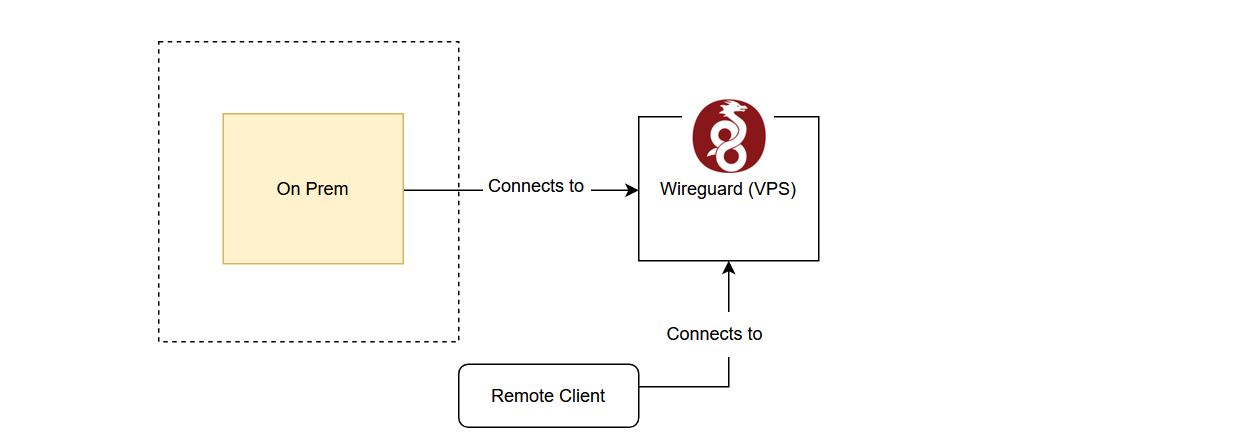
There were a few reasons why I wanted to run an external VPN server to access my infra:
- Minimal exposure of on-prem ports and IP. Running it on-prem would mean that I would need to expose a listening port on my on-prem hardware.
- I wanted to remotely administer my services.
- Technically not running C2 infra on VPS.
Nothing but UDP
To keep this configuration as secure as possible, the VPS is only tasked with running WireGuard and has minimal services.
With cloud-init and my cloud provider being able to spin up a VPS under 30 seconds, I also gain a very interesting choice: to manage my server (i.e. to add clients)
- I could manually SSH in to update the configuration
- or I could update the cloud-init config, tear down and spin up a new server, making my VPN server an ephemeral server.
Two sounded appropriately fun. And if I am constantly recreating the server and updating it with the latest patches when I spin it up, I don’t need remote access to patch or maintain it.
So remote access: gone. Can’t force open a door when the door is never installed in the first place.
- More secure VPN server. Now only the listening port is the UDP port required for initial WireGuard connections is required to be open.
- Cheaper. The VPN can be spun up as required and spun down when not.
And I immediately ran into problem 1:
Constantly recreating servers means that the IP is not fixed. How will clients know which IP to connect to?
I initially tried buying a fixed IP, and it took a few networking shenanigans before I was able to allocate the fixed IP consistently to the VPS and route WireGuard traffic through it. However, I realised this defeated the cost-efficiency purpose of an ephemeral server because I would have to pay to upkeep the fixed IP.
So I looked around for a cheaper method: Dynamic DNS.
Dynamic DNS works by having a domain (or subdomain) name resolve to an IP that you control. The idea is that the server would update the DNS entry when it receives its IPv4 IP address allocation. Clients would then query this DNS entry for the new IP address of the server to connect to. Duck DNS provides a free DDNS service.